


Important Notes
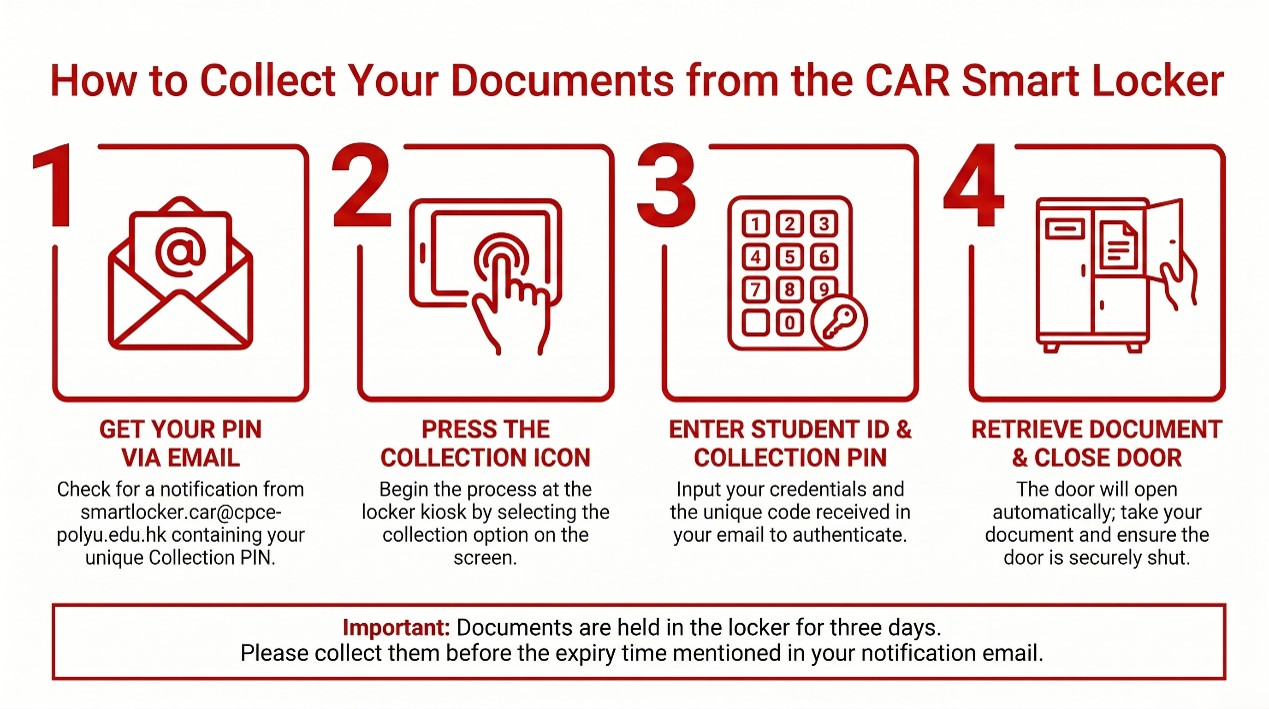
- Documents not collected after the expiry time will be cleared from Smart Locker. Please contact our administrative team at smartlocker.car@cpce-polyu.edu.hk if you have any enquiries.
- The User shall keep the notification email and collection PIN stated therein confidential. The User shall not disclose the information in the notification email to any third party (except the authorised representative, if applicable) before collecting the item deposited at the Smart Locker. The College shall not be liable for any loss or damage suffered or expense incurred because of or incidental to the loss or disclosure of the collection PIN regardless of whether such loss or disclosure is caused or attributed to the User’s fault or negligence.
- All rights granted by the College to the User for the use of the Smart Locker are entirely at the discretion of the College, and the User shall not have the right to assign, sublet or share the use of the Smart Locker with other third parties.
For more details about the collection of documents, please refer to the Frequently Asked Questions.
Frequently Asked Questions on Collection of Document
Your Collection PIN is provided in the automated notification email sent from smartlocker.car@cpce-polyu.edu.hk.
The Collection PIN is strictly required to retrieve your documents. If you have lost it, please email smartlocker.car@cpce-polyu.edu.hk and include your Student ID for verification. Our administrative team responds within three working days.
This error usually occurs under two circumstances:
- Expired Collection Period: Documents cannot be retrieved after the designated timeframe specified in your notification email, or
- Used or Invalid PIN: Each PIN is for single use only. Furthermore, the locker system will automatically lock after three unsuccessful login attempts. Ensure your PIN is valid and has not been used previously.
Yes, you may tap the “Re-Open” button on the display panel, provided that:
- It is within 60 seconds of the initial door opening.
- The screen still displays the collection page (i.e., it has not automatically returned to the Main Menu).
If you are unable to reopen the compartment, please email smartlocker.car@cpce-polyu.edu.hk with your Student ID for further assistance.
Please notify us immediately by emailing smartlocker.car@cpce-polyu.edu.hk. Remember to include your Student ID so our administrative staff can investigate the issue and respond within three working days.
If the document inside the locker does not belong to you or does not match your request, please leave it inside the compartment, securely close the door, and report the issue to smartlocker.car@cpce-polyu.edu.hk along with your Student ID.
If you have already closed the door, you may press the “Re-Open” button immediately to return the document. Alternatively, please either hand the incorrect document to our Counter Staff at the CAR Service Counter during the office hours, or place it in the document collection box at the CAR Service Counter during non-office hours (Location: WK-N3/F). Please also notify us by e-mail at smartlocker.car@cpce-polyu.edu.hk. We will follow up within three working days.